Look at a dark screen
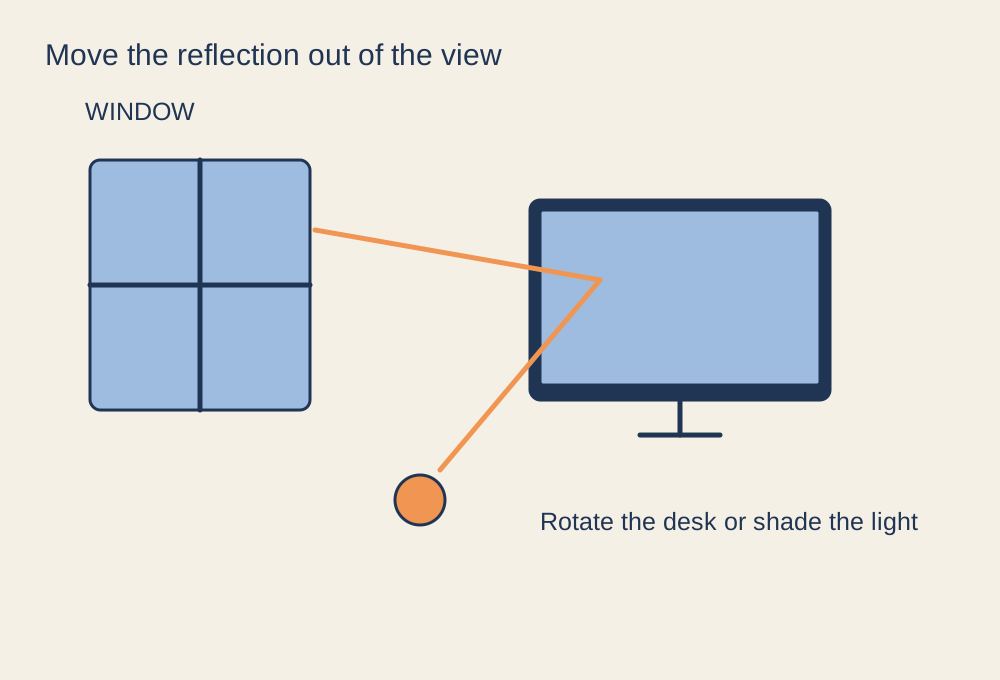
Glare is easiest to identify when the screen shows a dark scene or is switched off. Sit in your usual position and look for reflected windows, ceiling lights or lamps. Move your head slightly to see how the reflection changes. This tells you whether the problem is a particular light source rather than simply a display that is not bright enough.
Check at the time of day you normally play. A desk that is comfortable in the evening can face direct afternoon sunlight. Glossy furniture, pale walls or a bright light behind your shoulder may create reflections even when the lamp itself is outside your direct view.
Change the path of the light
Try rotating or moving the screen so the reflection falls away from your viewing position. Where the room allows, placing a display roughly at right angles to a window can be easier to manage than facing the window or sitting with it directly behind you. Use blinds or curtains to control sunlight rather than raising screen brightness to overpower it.
Move a desk lamp to illuminate the working surface without shining at the panel. A shade can help, but keep the lamp safely ventilated and use it as intended. Check the screen tilt too: tilting it back can catch an overhead light that was previously out of the reflection path.
Then adjust the image
Once the strongest reflections are controlled, set a brightness that suits the room. Excessively bright output in a dark space can be uncomfortable, while a very dim image in a bright room makes shadow detail harder to see. Avoid changing every colour and contrast setting while the actual problem is a window reflection.
Clean the display using its manufacturer's instructions, because smears can make reflected light more distracting. Do not assume an aftermarket anti-glare film is suitable for every panel; it can alter clarity and may have installation limitations. If reflections remain, consider the room layout and panel finish when replacing the monitor. For an existing setup, moving a lamp or shading a window is often the first useful experiment because you can judge the effect immediately.