Read the units and the route
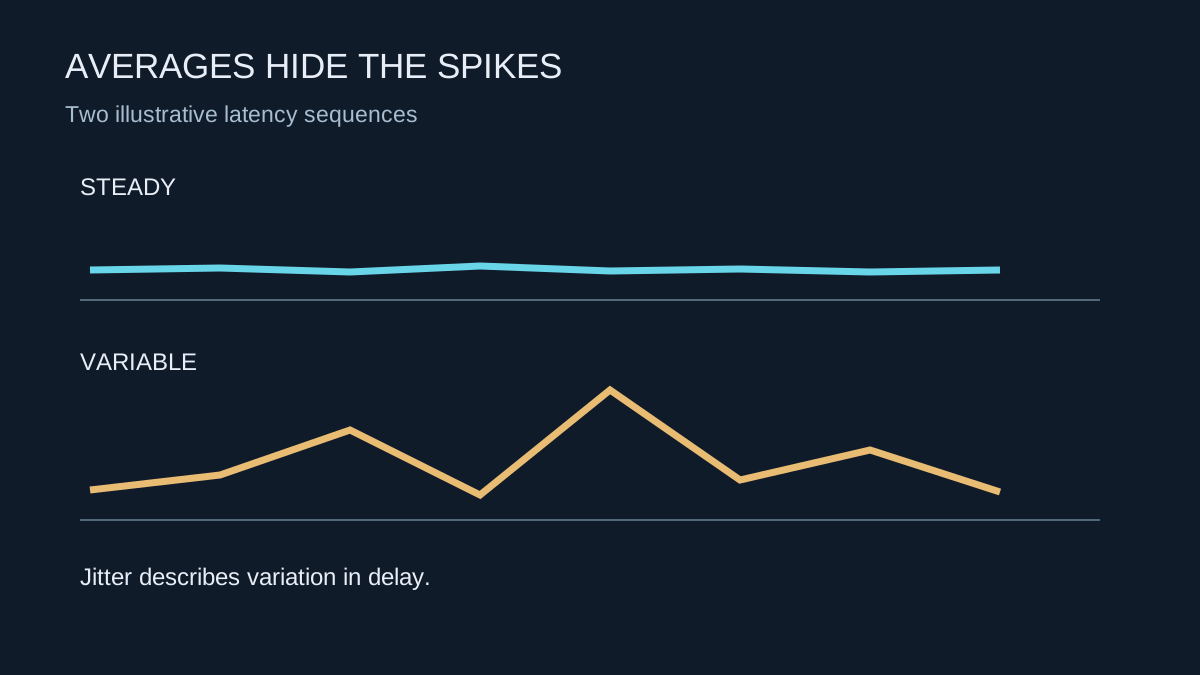
Ping commonly reports round-trip delay to a particular destination in milliseconds. Jitter describes variation in delay. A connection that repeatedly returns similar times behaves differently from one that alternates between short and long waits, even if their averages look alike. These measurements answer different questions from a download speed figure.
The destination matters. A nearby speed-test server is not necessarily on the same route as the game server. A low result to one location cannot prove that every match should have the same delay. Check the region selected by the game and note whether a party leader or matchmaking setting changes it.
Collect a small sequence instead of one number
Use the game's connection display where available and observe it over several minutes. Record normal delay, spikes, packet-loss indicators and what was happening at the time. A single screenshot taken after the match has ended can miss the problem entirely.
Try a quiet-network session and a session during normal household use. If delay rises when a large upload or download starts, the connection is showing load-related behaviour worth investigating. Pause that transfer or apply a documented bandwidth limit and repeat the comparison. Avoid changing the game region at the same time, since that would alter another part of the test.
A wired comparison can help separate Wi-Fi variation from problems beyond the router. Remember that an Ethernet cable to a wireless extender may leave a radio link in the path. Describe the actual route when asking for help.
Distinguish network lag from uneven frames
A game can feel hesitant because the PC is delivering frames unevenly while the network is stable. Conversely, the camera can remain smooth while other players appear to jump due to connection problems. Compare frame-time information with network indicators if the game provides both. Neither an average frame rate nor an average ping is a complete account of the experience.
Do not treat a ping test as an authoritative measurement of the game's own traffic. Diagnostic packets and game packets can receive different treatment, and some destinations do not answer diagnostics consistently. Use several pieces of evidence rather than replacing the router because one test produced a spike.
Make a useful report
Write down the time, game region, wired or wireless connection and whether other devices were transferring data. Include the repeated pattern rather than an isolated worst number. If the problem occurs across several services and a direct wired comparison, the internet provider has a clearer basis for investigation. If it occurs only in one game's region, check that service's status and support information first.
As a simplified example, imagine five readings of 30, 31, 30, 32 and 31 milliseconds, compared with 15, 16, 75, 18 and 31. Their averages are similar, but the second sequence contains a much longer wait. These invented values illustrate why a sequence matters; they are not a recommended threshold or a formal calculation of jitter. Games and diagnostic tools can calculate and label variation differently.