Two sets of pixels
The display resolution describes the image sent toward the screen. The game may render its three-dimensional scene at another resolution, then scale or reconstruct it into that output. Interface elements can be handled separately, which is why menus may remain sharp while the scene becomes softer.
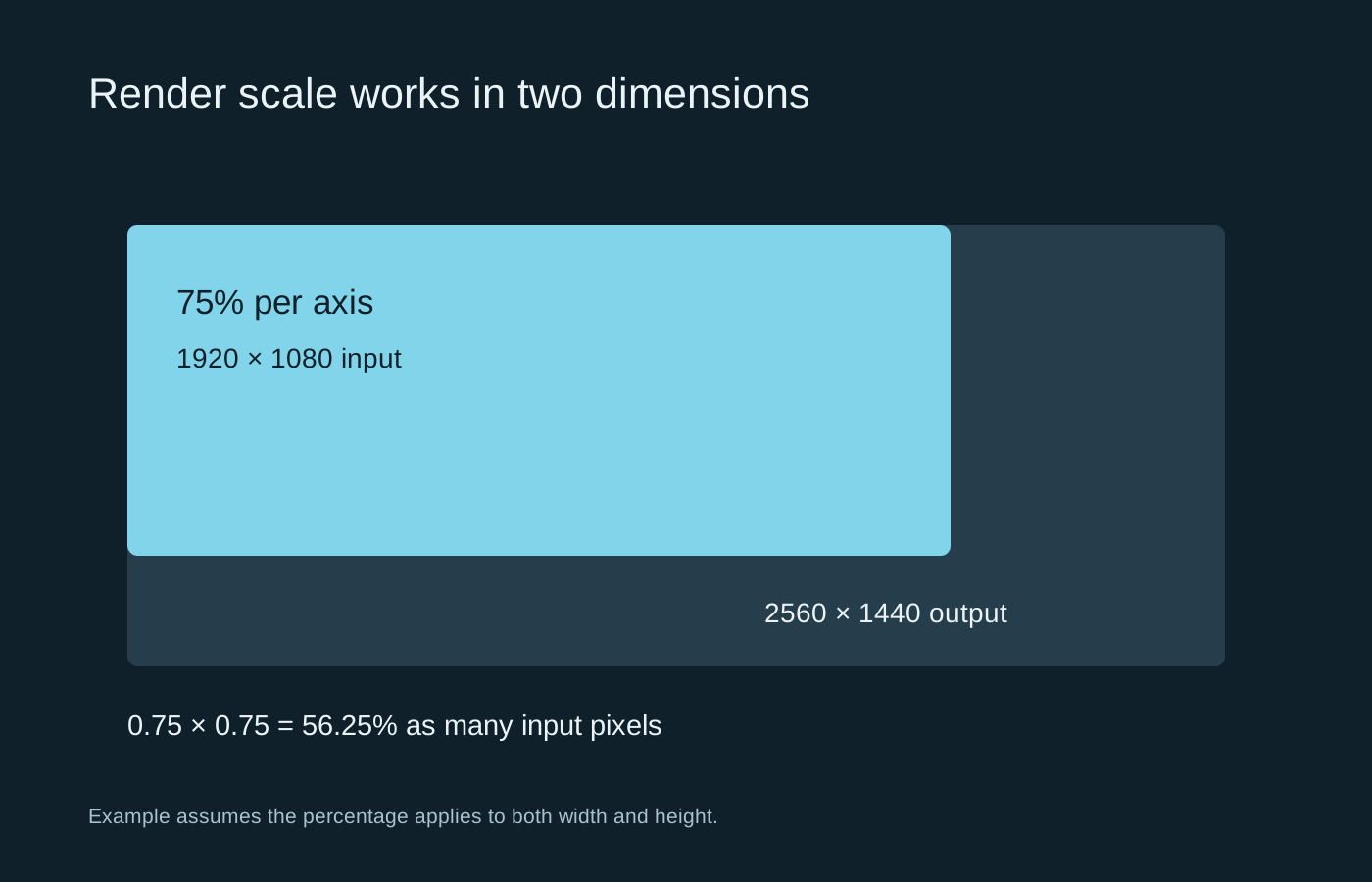
A render-scale percentage often applies to both width and height, but read the game’s description. At 2560 by 1440 output, a 75 percent scale on each axis gives 1920 by 1080 input. That is 56.25 percent as many pixels, because 0.75 is multiplied by itself. It is not simply a 25 percent reduction in pixel count.
Less rendering work does not promise an equal speed gain
Reducing input resolution can reduce part of the GPU’s workload. Other work remains: simulation, some effects, image reconstruction and presentation still take time. A game limited by something else may show little improvement. Do not expect a pixel-count reduction to translate directly into the same percentage increase in frame rate.
Check the scene while moving. Fine foliage, fences and distant lettering can reveal softness or shimmering that a still image hides. Use a familiar view and keep sharpening unchanged during the first comparison. Heavy sharpening can add halos without restoring the missing detail.
An upscaling mode may set the internal resolution for you, while dynamic resolution changes it during play to pursue a performance target. Avoid enabling several overlapping scaling controls without understanding which one is active. If the game greys out a percentage slider after selecting an upscaler, consult its explanation rather than assuming the setting is broken.
Choose the output deliberately
Using the screen’s intended native resolution for output often keeps the interface clear while allowing the game’s internal rendering controls to do the adjustment. A lower output resolution may behave differently because the display or graphics driver handles another scaling stage.
Compare the complete result on your own screen at the distance you normally sit. A screenshot magnified on another display can exaggerate issues that are not relevant to play, or hide motion problems entirely. Save a combination that meets your clarity and performance needs, including both the output resolution and the render or upscaling setting.