Confirm the symptom belongs to the connection
Packet loss means some transmitted data does not arrive as expected. In a game it can accompany missing updates, interrupted voice or abrupt corrections in movement. Similar-looking problems can also come from low frame rates or a busy server, so start with the game's own network indicators where available.
Record whether the loss is brief or sustained and whether it affects one game or several services. Check the publisher's service status before changing your setup. A wider outage and a fault affecting only one PC require different investigations.
Remove the most convenient variables
Pause large transfers and repeat a short session. If you normally use Wi-Fi, try a known-working wired connection to the main router where practical. Check that the cable is properly seated and not visibly damaged. A switch to wired that consistently removes the issue points towards the local radio path, although one quiet session is not conclusive.
If another device can perform a comparable test at the same time, note whether it is affected too. Two devices failing together suggest a shared path; one device failing while another remains stable suggests a narrower problem. Keep their connection types in mind, since a wired desktop and distant wireless laptop do not share every link.
Restart equipment only when it is safe to interrupt the household, and follow the provider's instructions. A restart that temporarily helps is an observation to record, not proof that the problem is permanently solved. Note how long the improvement lasts.
Be careful with diagnostic hops
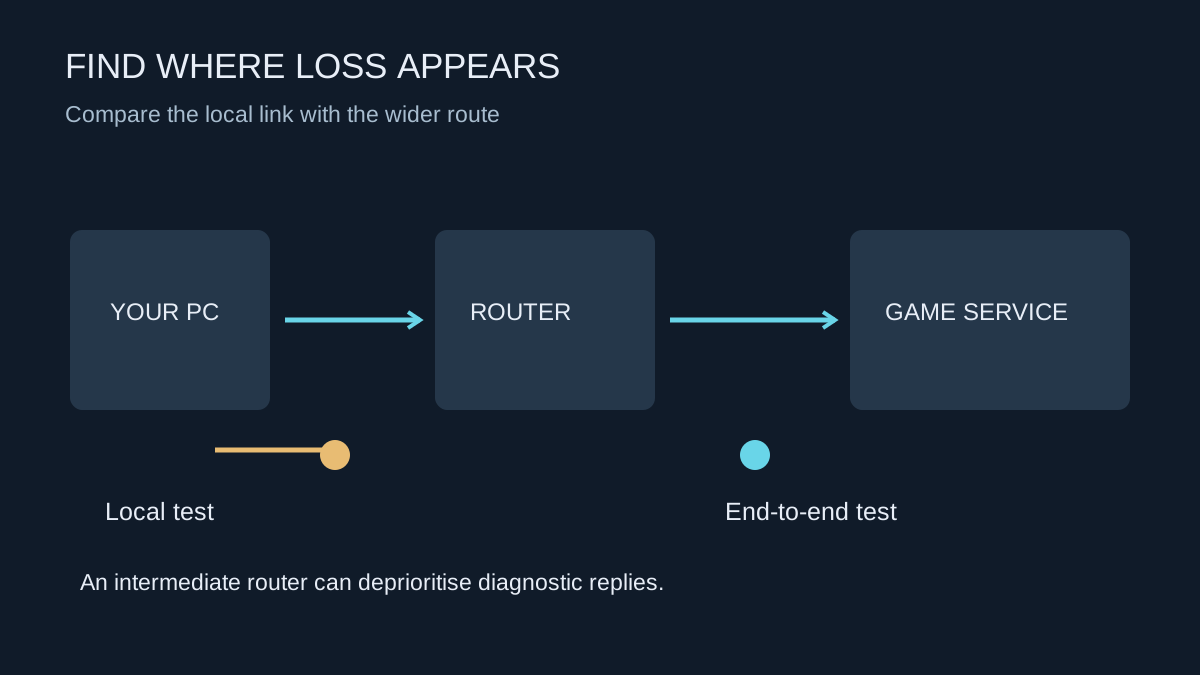
Tools that combine route tracing with repeated probes can be informative, but an intermediate router may limit or deprioritise diagnostic replies while forwarding normal traffic. Apparent loss at one intermediate hop does not establish a fault there when later destinations answer normally. Avoid turning an unfamiliar trace into a confident accusation against a specific network operator.
Likewise, a server that does not answer a ping request is not necessarily offline. Compare end-to-end symptoms with game behaviour and the provider's supported tests. Do not disable the firewall or expose the PC to the internet simply to make a diagnostic result look cleaner.
Escalate with a repeatable record
Provide the game, region, approximate times, connection layout and whether a wired comparison changed the outcome. Include meaningful test results without sharing account passwords or public screenshots containing unnecessary personal network details. If the issue appears only during heavy household traffic, say so; that observation is often more useful than the most alarming percentage in a trace.
A purchased gaming router cannot guarantee a cure for an upstream fault. First establish the part of the path you can influence. Replace a suspect cable when evidence points to it, improve wireless coverage when that comparison is clear, or ask the service provider to investigate a repeatable wider problem. Each step should narrow the cause rather than add more settings to undo later.